Getting your resume in front of an actual human isn’t as simple as it used to be. Write something solid, hit “Apply,” and hope for the best. That’s not really how it works anymore.
Most employers now run applications through some kind of applicant tracking system (ATS) before a recruiter ever lays eyes on them. Which means a genuinely well-written resume can still fall flat if the software behind the scenes can’t properly read what’s on the page.
So how do you write something that actually works in 2026?
Here’s the honest answer: it’s not about stuffing in keywords or writing something that reads like it was built for a robot. A resume that works with ATS software is simply one that’s clear, relevant, and easy to parse while using language pulled naturally from the job description and still sounding like an actual person wrote it.
That balance matters more now than it used to. Employers are dealing with massive applicant pools, shifting skill requirements, new AI tools creeping into recruiting, and increasingly specialized roles. If you’re also trying to figure out which career direction makes the most sense for you, working with a career coach can help you connect your experience, strengths, and goals to a practical job-search strategy. Your resume has to work for the software first, and then for the human who reads it right after.
This guide walks through how ATS systems actually work, what a resume needs to look like to get through them cleanly, the mistakes that quietly sink people, how to use keywords without overdoing it, and how to tailor your resume for specific jobs in 2026.
What “ATS-Friendly” Actually Means?
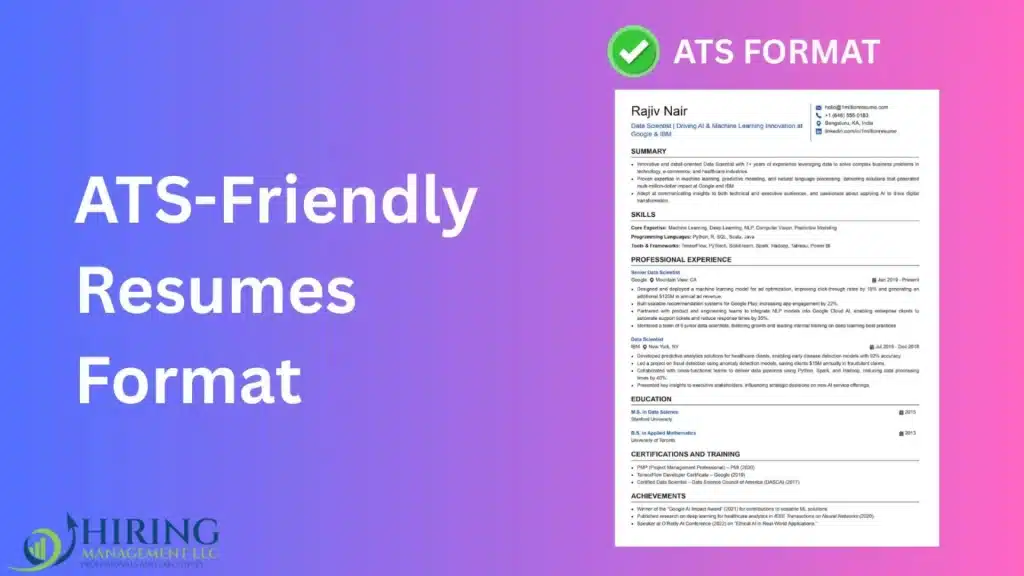
An ATS-friendly resume is one written and formatted so the tracking software behind it can accurately read, sort, and organize whatever’s on the page.
These systems typically try to pull out things like your name and contact info, work history, job titles, skills, education, certifications, employment dates, keywords, and professional qualifications. From there, recruiters search or filter that pulled-out data to find candidates who look relevant to whatever role is open.
Here’s something worth knowing upfront: there’s no single ATS platform every company runs. Different employers use different systems. Some parse resumes far better than others, and some layer extra AI tools on top of the base ATS.
Which means there’s no secret “ATS score” floating around out there guaranteeing you an interview, no matter what some confident LinkedIn post tells you.
The actual, realistic goal is simpler than that: build something the software can parse cleanly, and that a recruiter can genuinely understand once they see it.
Why Does This Matters More in 2026 Than It Used To?
Recruiting technology hasn’t slowed down at all. Employers keep leaning harder on digital systems to manage applications, search candidate pools, automate the tedious parts of hiring, and flag people who look relevant.
AI has become a much bigger part of this conversation too. LinkedIn’s 2025 Future of Recruiting report found that 37% of organizations were actively integrating or experimenting with generative AI somewhere in their recruiting process.
To be clear, that doesn’t mean AI is making hiring decisions on its own human recruiters are very much still in the loop. But it does mean your resume is probably passing through more than one digital filter before a person ever actually reads it.
So a strong resume in 2026 needs to pull off two things at once: be readable by machines, and be genuinely relevant to humans. If the software can’t parse it properly, your accomplishments might never even register. And if a recruiter can technically read it but can’t quickly figure out why you’re qualified, no amount of clever formatting is going to save you.
How an ATS Actually Reads Your Resume?
It helps to think of an ATS less like a reader and more like a database.
When you upload a resume, the system tries to pull information out and slot it into structured fields. Say your resume includes something like:
Marketing Manager, ABC Company, 2022–2026 increased qualified leads by 42% through SEO and content marketing.
A decent ATS might extract that into something like: job title (Marketing Manager), employer (ABC Company), dates (2022–2026), skills (SEO, Content Marketing), and achievement (42% increase in qualified leads).
That’s exactly why simple structure matters so much. If key information is buried inside fancy graphics, oddly placed text boxes, or decorative design elements, the software can genuinely just miss it. And the end result is a resume that looks great to a human but communicates almost nothing to the system doing the first pass.
What an ATS-Friendly Resume Actually Looks Like?
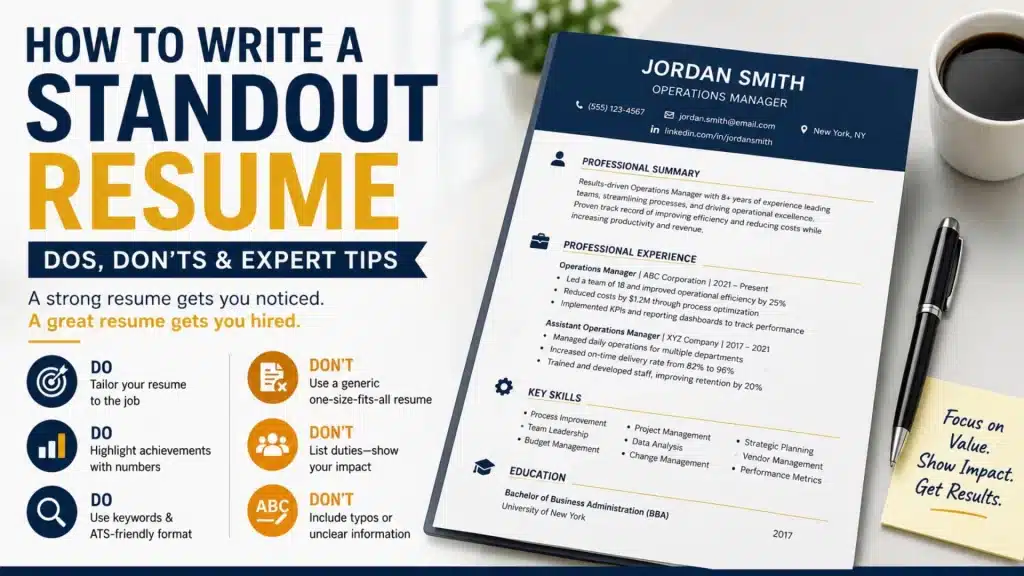
Simplicity is the safest bet here. A resume that plays well with ATS software tends to have a clean, uncluttered layout, standard section headings, consistent formatting, readable fonts, clear job titles, consistent date formats, naturally woven-in keywords, bullet points, concrete accomplishments, and no unnecessary graphics, complicated tables, or important text buried inside images.
None of this means your resume has to look boring. It just means clarity has to win over decoration, every single time. A recruiter should be able to glance at your resume for a few seconds and immediately understand what you do, what you’ve accomplished, and why you’re relevant to this particular role.
Stick to Standard Section Headings
One of the easiest wins for ATS compatibility is simply using familiar section names instead of clever ones.
Reliable choices include:
- Professional Summary: a short intro covering your background and strongest qualifications
- Work Experience: your relevant employment history
- Education: degrees, schools, and any relevant academic detail
- Skills: the technical and professional skills that actually matter for the role
- Certifications: any relevant professional certifications or licenses
- Projects: useful if you’ve got project work that demonstrates skills your employment history alone doesn’t cover
Skip the creative headings — “My Journey,” “What I Bring,” “Career Highlights.” A human might puzzle out what you mean. A resume parser very often won’t.
Picking the Right Format
For most professionals in the U.S. job market, reverse-chronology is still the safest bet, the most recent role first, working backward. It makes it easy for a recruiter to trace your career progression at a glance.
A functional resume, built heavily around skills rather than a chronological history, can occasionally make sense for people with unconventional career paths. But hiding your employment dates or building a confusing timeline tends to backfire; it makes life harder for both recruiters and ATS software alike.
Using Keywords the Right Way
Keywords genuinely matter. Keyword stuffing does not.
The smart move is figuring out the actual language a specific employer uses and weaving relevant terms naturally into your resume, not bolting on a random list at the bottom.
Say a job description reads: “Seeking a project manager with experience in Agile methodology, stakeholder management, risk assessment, and cross-functional team leadership.”
If you genuinely have that background, your resume should reflect it in context, something like: “Led cross-functional Agile projects involving product, engineering, and marketing teams while managing stakeholder communication, project risks, and delivery timelines.”
That’s far more convincing than a bare list of the same terms repeated back to back. The first version demonstrates real experience. The second just looks like someone gaming the system, and it usually reads that way to a human too.
Relevant terms can show up naturally throughout your summary, experience bullets, skills section, project descriptions, certifications, and education section where relevant. One rule you really shouldn’t break: don’t list skills you don’t actually have. Your resume needs to hold up in an actual conversation, not just clear a filter.
Matching Your Resume to the Job Description
One of the single most effective things you can do is stop sending the same resume everywhere and start actually tailoring it per role.
Read the job description slowly. Look for the specific job title, the required skills that keep coming up, the day-to-day responsibilities, the qualifications being asked for, and any language that repeats more than once.
Then hold that up against your own background. If a job description keeps circling back to things like client relationship management, Salesforce, account growth, and pipeline management — and you genuinely have that experience make sure your resume says so clearly. Not vaguely, not implied. Clearly.
Write Bullets That Show Results, Not Just Duties
One of the most common resume mistakes is describing what your job was instead of what you actually did with it.
Compare “Managed social media accounts and created content” with “Managed social media campaigns across LinkedIn, Instagram, and Facebook, increasing qualified website traffic by 38% over 12 months.” The second version tells an employer what you did and what happened as a result. That’s the difference that actually lands.
Where you genuinely can, back things up with real numbers: revenue, cost savings, growth percentages, customer counts, conversion rates, time saved, team size, projects completed. If you’re struggling to identify which accomplishments belong on your resume, professional guidance can also help you turn everyday responsibilities into stronger, results-focused career stories.You don’t need a number crammed into every bullet, but specific, concrete evidence makes your accomplishments far more believable than vague summaries ever will.
Lead With Strong Action Verbs
Start bullets with verbs that actually convey action: led, managed, developed, improved, increased, reduced, built, created, negotiated, analyzed, implemented, designed, launched, optimized, coordinated, delivered.
“Responsible for managing a team of 12 employees” turns into “Managed a 12-person team responsible for customer operations and service delivery.” Small change, but it reads a lot more direct and a lot more confident.
Keep It Readable for Humans, Not Just Machines
Even a perfectly ATS-optimized resume still has to actually impress the person reading it. Avoid turning the page into a wall of dense text lean on short paragraphs, bullet points, clear consistent headings, even spacing, and reasonable margins.
For most professionals, one to two pages does the job. There’s no hard rule that everything has to fit on a single page. A senior executive with two decades of relevant experience might genuinely need the extra room. The real guiding principle is relevance, not length. Don’t pad a page just because there’s white space left to fill.
Skip the Fancy Graphics
Modern resume templates can look genuinely impressive right up until they start working against you.
Be cautious with infographics, skill bars or progress meters, company logos, oversized icons, decorative charts, text embedded inside images, multi-column layouts, complicated tables, and important info tucked into headers or footers.
A simple resume is usually the safer play. Instead of a graphic showing “Excel 90%,” just write “Advanced Excel.” It’s easier for both a human and a piece of software to actually process.
PDF or Word? Whatever They Ask For
The honest answer is: follow the employer’s instructions. If a posting specifically asks for a PDF, send a PDF. If they want Word, send Word.
If nothing’s specified, PDF is a reasonable default since it holds its formatting no matter what device or system opens it. But the file type isn’t really the crux of the issue; what matters is whether the document contains actual selectable text and a structure the employer’s system can parse cleanly.
Before submitting anything, open the final file and test it. Try highlighting the text. If you can’t select it properly, there’s a good chance it got saved as an image rather than readable text, and that’s a real problem worth fixing before you hit send.
Testing Your Resume Before You Send It
A few quick checks can save you from an easily avoidable mistake:
- Copy-and-paste test. Copy the whole resume and paste it into a plain text document. Does everything still appear in the right order? If it comes out scrambled, your formatting is probably creating parsing problems.
- Keyword search. Use your document’s search function to check whether the important skills and qualifications from the job description are actually present, and in the right places.
- Date consistency. Make sure employment dates follow one format throughout “January 2022 – Present” used consistently, not a mix scattered across the page.
- Job title clarity. Use recognizable titles. If your official internal title was unusual or company-specific, it’s often fair to clarify it with a standard equivalent in parentheses, as long as it’s accurate something like “Client Success Specialist (Customer Success Manager).” The goal is clarity, not spin.
Mistakes That Quietly Sabotage Resumes
- Sending the same resume everywhere: A generic resume might be sort of relevant to a lot of jobs and perfectly matched to none of them. Customize for the roles that actually matter to you.
- Stuffing in keywords: Repeating the same term over and over makes a resume read unnaturally, and it’s usually obvious to a human reviewer too.
- Leaning too hard on flashy templates: Visual polish should never come at the expense of readability.
- Listing duties without results: Employers care about what you actually accomplished, not just what your job description technically said.
- Claiming skills you don’t have: You might slip past an initial filter, but it tends to unravel fast in an interview.
- Overloading old experience: Some earlier roles are worth keeping, but not every job from the start of your career deserves equal real estate. Prioritize what actually supports where you’re headed now.
- Ignoring the job description entirely: It’s practically a roadmap for how to customize your resume.
Where Career Coaching Fits Into This?
Building an ATS-friendly resume is just one piece of a much bigger job search puzzle. You also need clarity on your target role, a way to communicate your value clearly, a strategy for positioning your experience, and solid interview prep.
This is where career coaching services can genuinely help. JobChangeNow focuses on career transitions and professional development, helping professionals who are changing industries, pursuing a new type of role, or trying to reposition their existing experience more effectively.
Career changes create a particular kind of resume challenge: you might have plenty of transferable skills, just not the exact job title an employer is scanning for. Take someone working as a project coordinator who wants to move into full project management.
The resume shouldn’t just say “I want to become a project manager” it should show the project-management-adjacent experience already built up: coordinating cross-functional projects, managing timelines, tracking deliverables, communicating with stakeholders, and supporting teams through successful completion. That reframing makes the career direction obvious, because it ties existing experience directly to where the person wants to go next.
A Simplified Example
Professional Summary: Project management professional with 7+ years of experience coordinating cross-functional initiatives, managing project timelines, improving operational processes, and communicating with internal and external stakeholders. Experienced in Agile project environments, risk management, and team coordination.
Project Manager | ABC Company | 2023–Present
- Led 12 cross-functional projects from planning through delivery
- Reduced average project delays by 24% through improved scheduling and risk tracking
- Coordinated product, engineering, marketing, and operations teams
- Managed stakeholder communication and weekly project reporting
- Implemented Agile workflows that improved project visibility across departments
Project Coordinator | XYZ Company | 2020–2023
- Coordinated project schedules, meetings, documentation, and deliverables
- Maintained project tracking systems and monitored deadlines
- Supported project managers with risk identification and stakeholder communication
- Improved reporting processes and reduced manual administrative work
Notice what makes this actually work: relevant keywords appear naturally, the headings are standard, results are measurable, responsibilities are explained clearly, and it still reads well to an actual human recruiter.
Should You Use AI to Write Your Resume in 2026?
AI can genuinely help during the writing process spotting relevant keywords, tightening up wording, organizing information logically, catching repetitive phrasing, comparing your resume against a job description, and brainstorming ways to phrase accomplishments.
What it shouldn’t do is invent experience for you. Your resume needs to stay accurate and genuinely yours.
A reasonable workflow looks like: your real experience → AI-assisted editing → fact-checking → your own final revision pass.
The finished resume should still sound like you wrote it. AI’s job here is to help communicate your experience more clearly, not manufacture experience you don’t have. This matters more than it might seem, because recruiters can and do ask about anything listed on your resume. If you can’t speak to a skill confidently in an interview, it really shouldn’t be on the page.
A Quick 2026 Checklist Before You Submit
- Formatting: Simple, uncluttered layout? Standard headings? Easy to read? No unnecessary graphics? Can someone scan it quickly?
- Content: Does the summary match this specific role? Are your strongest accomplishments easy to spot? Did you quantify results where you could? Are job titles and dates clear and consistent?
- Keywords: Did you read the job description closely? Are relevant terms worked in naturally? Is every keyword backed by real experience? No stuffing?
- ATS compatibility: Can you select all the text in the file? Does copy-paste keep everything in order? Is important info sitting outside of images or graphics? Did you follow the employer’s file-format instructions?
- Human review: Can a recruiter understand your value in a few seconds? Does the resume actually show results? Is everything on there relevant? Does it tell a coherent career story?
If you’re answering yes across the board, you’re in solid shape for the software and the human on the other side of it.
Conclusion
Writing an ATS-friendly resume in 2026 was never really about outsmarting a piece of software. It’s about making your professional value obvious and easy to understand to a machine first, and then to the human who reads it next.
Keep the format clean. Use standard headings. Match your genuine skills to the actual job description. Write bullets that show results, not just duties. Use numbers where they strengthen your case. Skip the unnecessary graphics. Follow whatever file instructions the employer gives. And above everything else, make sure the resume still makes sense and sounds like you when an actual person reads it.
The best ATS-friendly resume was never the one crammed with the most keywords. It’s the one that draws a clear, honest line between your experience and what the employer actually needs.
If you’re navigating a career change, or struggling to explain how your existing experience fits somewhere new, it’s worth looking past formatting altogether. Career direction, positioning, networking, interview prep, and personal branding all shape a job search just as much as the resume itself.
Resources like JobChangeNow can be a genuinely useful next step for anyone who wants more structured guidance through a career transition or a broader job search.
Need help with your next career move? Explore JobChangeNow’s career coaching services to get personalized guidance on career direction, positioning, job-search strategy, and professional growth.
FAQ
What exactly is an ATS-friendly resume?
One built with clean formatting, standard section headings, naturally placed keywords, and readable text so applicant tracking software can process it accurately.
What resume format works best for ATS?
A straightforward reverse-chronological format is generally your safest bet. Stick to standard headings, readable fonts, clear dates, and simple formatting and always follow whatever specific instructions the employer gives.
Should I use keywords straight from the job posting?
Yes, but only ones that genuinely reflect your actual skills and experience. Work them naturally into your summary, skills section, and experience bullets rather than repeating them unnecessarily.
Can a good resume still get rejected by an ATS?
It’s possible for a system to misread or deprioritize information in an otherwise strong resume, which is exactly why clean formatting and relevant terminology matter so much. That said, there’s no single universal ATS or magic score that determines whether any candidate lands an interview.
How often should I update my resume?
Whenever you gain meaningful new experience, skills, certifications, or measurable wins. It’s also worth customizing your resume for any application that genuinely matters to you, rather than relying on one catch-all version forever.
Also Read: What Are Executive Coaching Services