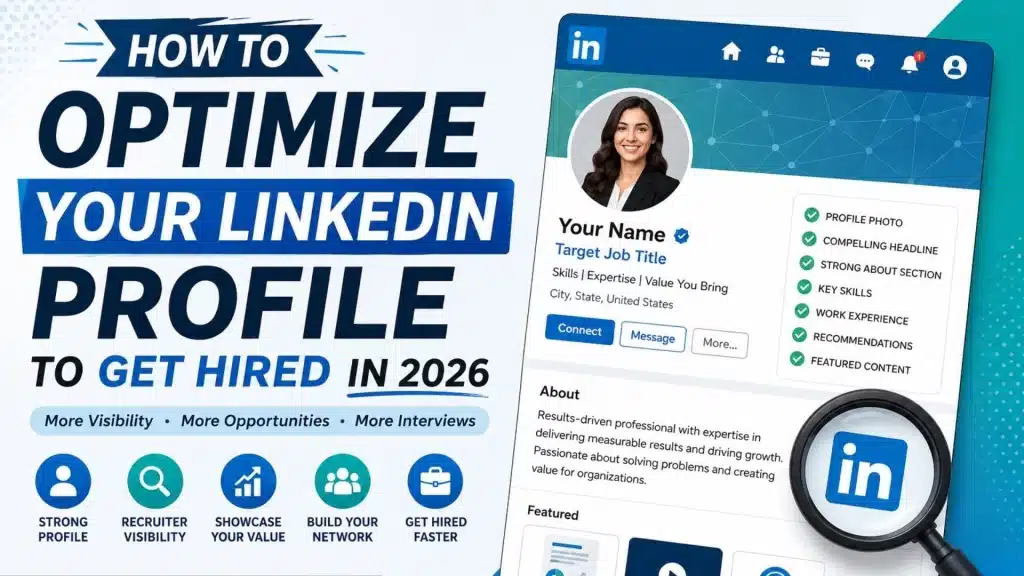
If you’re sending out applications and hearing next to nothing back, your resume might not be the only culprit. Your LinkedIn profile plays a bigger role than most people give it credit for; it shapes whether recruiters even find you, whether they understand what you actually do, and whether they bother reaching out at all.
Getting this right matters more than ever right now. LinkedIn’s own 2026 research found that the number of U.S. applicants per open role has roughly doubled since spring 2022. The same research found that 93% of recruiters plan to lean on AI more in 2026, and 59% say AI is already surfacing candidates whose skills they’d otherwise have missed.
Which means your profile needs to do more than just log your job history. It needs to make clear, quickly, what you do, what you’re actually good at, and what value you bring to whoever’s reading it.
Whether you’re applying actively, casually browsing while employed, or gearing up for a career change, here’s how to make your profile work harder for you.
Why This Actually Matters for a Job Search
Think of your LinkedIn profile as your professional first impression, minus the handshake.
Recruiters search LinkedIn using job titles, skills, experience, and location, among other filters. LinkedIn’s own Recruiter tools also pull skills from all over your profile, not just your Skills section, but your headline, your summary, your job descriptions, even your certifications.
Which means optimizing your profile isn’t really a cosmetic exercise. It’s closer to a mix of:
- A professional introduction
- A searchable career record
- A personal brand
- A portfolio of what you’ve actually done
- A networking tool
- A recruiter-facing pitch
And the point isn’t to sound impressive to everyone who stumbles across it. It’s to be sharply relevant to the specific employers and recruiters you actually want to reach.
Start With the Job You Want, Not the One You Have
Before you touch any individual section, get clear on the role you’re targeting. Say you’re a marketing manager hoping to move into a senior digital marketing role. Skip the vague version:
“Experienced marketing professional with a passion for helping businesses grow.” and go with something that actually says something:
“Digital Marketing Manager | SEO & Content Strategy | Lead Generation | B2B Growth”
The second one tells a recruiter, instantly, what you do and where your strengths lie.
A good exercise here: pull up 10 to 15 job descriptions for roles you actually want, and note what keeps repeating job titles, technical skills, specific software, certifications, industry knowledge, leadership scope, business outcomes. Then work that language naturally into your profile.
Just don’t copy-paste whole job descriptions or cram in keywords for the sake of it. Use the language employers genuinely use, but keep it sounding like you wrote it. LinkedIn itself notes that recruiters can pick up skills both from a dedicated Skills section and from text scattered across the rest of your profile.
Write a Headline That Actually Tells People Something
Your headline shows up constantly in search results, connection requests, comments, messages. It’s doing more work than almost any other line on your profile, so don’t waste it on just your job title.
Weak: Marketing Manager at ABC Company
Better: Marketing Manager | SEO | Demand Generation | B2B Content | Revenue Growth
The real question your headline should answer is: what do you want to be known for professionally?
A formula that tends to work well:
Target Role + Core Skills + Specialty or Outcome
A few examples of what that looks like in practice:
- Software Engineer | Python | AWS | Cloud Applications
- Project Manager | Agile | SaaS Implementation | Cross-Functional Leadership
- Financial Analyst | FP&A | Financial Modeling | Business Forecasting
- Sales Director | B2B SaaS | Revenue Growth | Enterprise Sales
If you’re switching careers, lean into whatever transferable skills bridge your old role and the one you’re chasing next.
Make Your About Section Actually Say Something
This isn’t the place for your life story. Use it instead to explain what you do, what problems you solve, what you’ve actually pulled off, and what you’re looking for next.
Something like:
“I help B2B companies turn complicated marketing challenges into measurable pipeline growth. Over the past eight years, I’ve led SEO, content, and demand-generation programs that increased qualified leads and improved customer acquisition.”
Then back that up with specifics. Numbers do a lot of heavy lifting here.
Instead of:
“Managed a large sales team.”
Try:
“Led a 12-person sales team and grew annual revenue by 24% over two years.”
This connects back to the idea of a clear value statement communicating what you’re actually worth to an employer, rather than just listing what you were assigned to do. Job Change Now has a separate resource on building a strong value statement if you want to dig further into this specific skill.
Turn Your Experience Section Into Evidence, Not a Job Description
The single most common LinkedIn mistake: writing every role as a list of duties instead of results.
- Duty-focused: Managed customer accounts and handled monthly reporting.
- Results-focused: Managed 45 enterprise accounts and introduced a reporting process that cut monthly reporting time by 30%.
The second version actually gives a recruiter something to evaluate.
For each role that matters, try to cover: what you were responsible for, what problem you were solving, what you actually did about it, and what changed as a result. A simple formula: Action + Skill + Outcome.
For example:
“Redesigned the customer onboarding process using Salesforce automation, cutting average onboarding time from 14 days to 9.”
You don’t need a metric attached to every single bullet but wherever a real number exists (dollars, percentages, team size, time saved), use it.
Be Deliberate About Your Skills, Not Exhaustive
Your Skills section should map directly to the job you’re chasing. LinkedIn currently lets you list up to 100 skills. That doesn’t mean you should. Prioritize what’s:
- Relevant to your target role
- Actually mentioned in job descriptions you’re targeting
- Backed up by real experience
- Current, not something you haven’t touched in a decade
- Meaningful within your industry
LinkedIn has reported that members who list at least one skill see up to twice as many profile views and connection requests, and up to four times as many messages. The takeaway is pretty simple: make sure the right skills are visible, not just present.
If you’re going for a data analyst role, for instance, something like SQL, Excel, Python, Tableau, Power BI, and financial modeling probably matters more than a laundry list of generic soft skills.
And skills shouldn’t live only in the Skills section if “project management” matters to your target role, it should also show up naturally in your About section and your experience bullets, not just as an isolated tag.
Use the Featured Section to Actually Show Your Work
Your profile describes what you can do. Features are where you can prove it. Worth adding here:
- Portfolio pieces
- Presentations
- Case studies
- Published writing
- Certifications
- Videos of your work
- Project summaries
A UX designer might feature a case study on how they reshaped a product’s user experience. A salesperson might feature a walkthrough of a strategy that actually worked. A project manager might feature a summary of a complex initiative they saw through to completion. The strongest profiles don’t just describe them, they provide receipts.
Get Recommendations That Actually Add Credibility
Recommendations carry weight precisely because they’re someone else’s account of your work, not your own. Ask former managers, colleagues, clients, or partners for something specific rather than a vague blurb.
Skip:
“Can you write me a recommendation?” and try instead:
“Would you be up for writing a short recommendation about our work together on the customer migration project?”
Specific asks tend to produce specific, more useful recommendations. Endorsements matter too. LinkedIn says skill endorsements can help you get discovered for opportunities tied to those specific skills.
Use Open to Work Deliberately, Not Just Reflexively
If you’re actively job hunting, take a moment with LinkedIn’s Open to Work settings. You can specify what kinds of roles you’re targeting, which helps recruiters understand what you’re actually going for.
The key here is consistency. If your headline says “Senior Financial Analyst” but your Open to Work preferences point toward “Marketing Director,” that’s confusing to anyone looking at your profile.
Your headline, About section, experience, skills, Open to Work settings, and resume should all be telling roughly the same story. Contradictions here tend to raise more questions than they answer.
Don’t Let the Profile Sit There Be a Little Active
A strong profile is only half of an effective LinkedIn strategy. The other half is actually showing up on the platform. You don’t need to post daily. What helps more:
- Leaving thoughtful comments on relevant posts
- Sharing something genuinely useful once in a while
- Talking about a project you worked on
- Congratulating people in your network on real milestones
- Following companies you’re interested in
- Connecting with people who make sense for your career direction
- Engaging professionally with recruiters
You’re not trying to become an influencer here. You’re just trying to stay visible to the right audience. If you’re targeting a product management role, for instance, commenting thoughtfully on product-strategy conversations reinforces that positioning in a way that’s a lot more natural than announcing it outright.
Reverse-Engineer Job Postings to Guide Your Edits
One of the more practical ways to sharpen your profile: pull five target job descriptions and note what keeps showing up across all of them.
Say the recurring themes are:
- Product strategy
- Roadmap development
- Agile
- Stakeholder management
- Data analysis
- User research
Now go back to your profile and check do those concepts actually appear? If not, you’re probably underselling experience you already have.
This matters even more given how much hiring has shifted toward skills-based evaluation. LinkedIn reported that 93% of talent-acquisition professionals believe accurately assessing candidate skills is central to hiring well.
Mistakes That Quietly Weaken a Good Profile
Even someone with genuinely strong experience can undersell it with poor presentation. Watch for:
- A vague headline: “Experienced professional looking for opportunities” tells a recruiter almost nothing.
- An About section that goes on forever: Front-load the value recruiters should get your positioning within the first couple lines.
- Duties instead of achievements: Responsibilities describe what you were assigned. Achievements describe what you actually did with it.
- Piling on irrelevant skills: More isn’t automatically better relevance beats volume.
- An unprofessional photo: Clear, current, well-lit. That’s really the whole bar.
- Missing or buried contact info: Make it easy for someone to actually reach you.
- Treating LinkedIn like a copy of your resume: It should complement your resume, not just repeat it word for word.
A Practical Checklist Before You Ramp Up Applications
Run your profile against this before you apply to another batch of jobs:
- Professional profile photo
- A headline built around your target role
- A strong, specific About section
- Job titles that reflect your actual scope
- Results-focused experience bullets
- Skills chosen deliberately, not dumped in
- Recommendations that speak to real strengths
- Featured work that provides evidence
- Current education and certifications
- Consistent location and career preferences
- Open to Work settings reviewed and accurate
- Some visible professional activity
- Contact info easy to find
- Language that echoes your target job descriptions
If a handful of these are still unchecked, it’s probably worth fixing the profile before you flood it with more applications.
Where Job Change Now Fits Into This
Optimizing LinkedIn gets a lot easier once you actually understand what hiring managers are looking for in the first place.
Job Change Now works with professionals to communicate their value clearly through career guidance, professional branding, resume support, and career-transition strategy. The core of the approach is building a clear Value Identity and Brand Identity so everything a candidate puts out, across every channel, tells a consistent story.
The resources also get specific about LinkedIn itself job alerts, Open to Work, recruiter outreach, recommendations, professional content, and how to showcase your work effectively.
If you’re navigating a bigger career shift, the career-transition support side of Job Change Now can help you think past just your LinkedIn profile and build out a broader search strategy. There’s also dedicated support for resume and LinkedIn optimization together, if you want both pieces aligned at once.
Conclusion
Optimizing your LinkedIn profile isn’t just about making it look polished anymore. It’s about positioning yourself clearly in a hiring landscape that’s leaning more and more on skills data and AI tools to find candidates.
Start with the role you’re targeting. Build a headline that says something real. Use the About section to explain your actual value. Turn your duties into measurable wins. Choose your skills deliberately. Back it all up with real evidence. Then stay a little active so you’re actually visible.
More than anything, make sure your LinkedIn tells the same story your resume tell and the same story you tell in an actual interview.
If you’re gearing up for a career change, don’t just apply to more jobs and hope something sticks. Fix how employers see your value first. When your profile, resume, networking, and interview prep are all pointed in the same direction, LinkedIn optimization stops being a chore and starts becoming a genuine part of your overall strategy.
If you want structured guidance through that process, Job Change Now offers career advisory support built around communicating value clearly, sharpening your professional positioning, and navigating a job or career change with a lot more confidence.
FAQ
How do I actually optimize my LinkedIn for a job search?
Start with your target role. Then rework your headline, About section, Experience section, and Skills using real language pulled from job descriptions you’re going after. Lean on measurable achievements and make your intended direction obvious.
What should go in my headline?
Your target role, your key skills, and a specialty or outcome. Something like: “Senior Project Manager | Agile Delivery | SaaS Implementation | Cross-Functional Leadership.”
How many skills should I actually list?
LinkedIn allows up to 100, but relevance beats quantity every time. Prioritize what actually matches your target roles and what you can genuinely back up with real experience.
Does LinkedIn actually help you find a job?
Yes, it helps you discover openings, connect with recruiters, build real relationships, and get found through recruiter searches. LinkedIn reports more than 66 million job seekers visit LinkedIn Jobs weekly, and members have collectively added hundreds of millions of skills to their profiles.
Should I fix LinkedIn before I apply to more jobs?
Ideally, yes. Getting your profile in shape first helps recruiters actually understand your qualifications and keeps your professional presence consistent across applications, networking, and interviews alike.